


D2R Loot Filter Guide: Why Players Need It and Third-Party Solutions
09.01.2026 - 05:38:45
Diablo 2: Resurrected , Game Guides


Diablo II: Resurrected is an ARPG developed by Blizzard. It is a remastered version of the classic that was released over two decades ago, and the company has implemented a slew of improvements this time around. Not only can you expect crisper graphics, but some quality-of-life improvements have been added, including widescreen support, the ability to zoom in and out of the map using the mouse wheel, and large font mode, among many others.
Surprisingly, despite all of the massive improvements just mentioned, the game still has a loot problem. And no, I am not talking about the best D2 Ladder items not dropping. Rather, I am referring to the loot filter (or lack thereof).
This article will serve as your guide to the D2R Loot Filter. There is actually an item filter that exists for this game, albeit it’s not exactly similar to other ARPGs out there. Still, if you are interested in knowing how to use it yourself, then I highly recommend that you read further to learn more!
Now, if you are having trouble finding the rarest loot, you don’t have to farm them yourself. You can simply visit our D2R Store, where we are stacked to the gills with the most uber rare items, such as the Jah and Ber Runes, the Enigma Archon Plate, and so much more!
What is Loot Filter and How It Works?
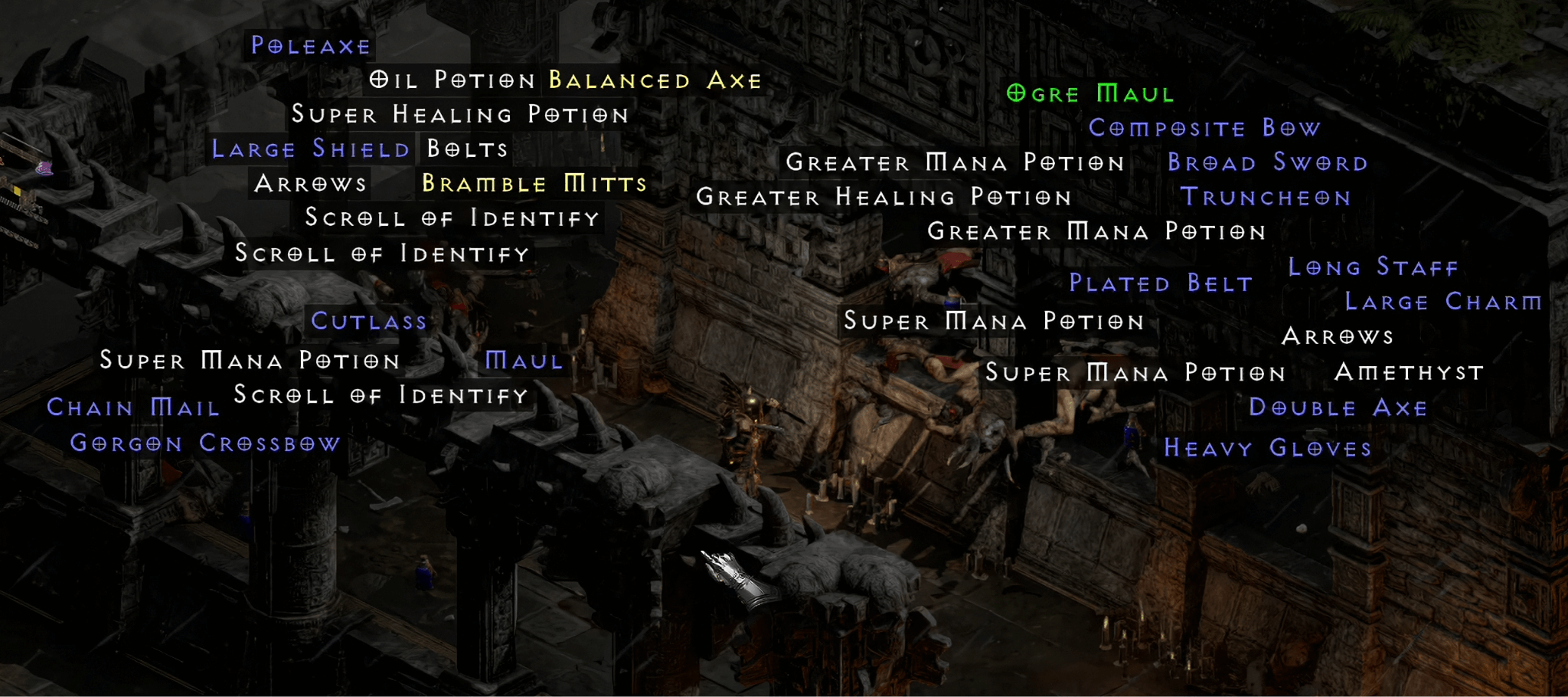
Before we begin, I want you to look at the image above. What do you see? If you see a bunch of different items, then you are correct. This is actually a common occurrence in Diablo II: Resurrected.
You might think that this is not a huge problem, but wait until you see the complaints of other players, where some of them had missed some pretty rare treasures (which were fortunately “found” by their party members).
When you reach the endgame of D2R, most of your time will be spent teleporting with an Enigma Mage Plate or something similar, and then going to specific farming spots like The Pit and Chaos Sanctuary.
Once you arrive at those locations, you will kill the enemies in the area with your most powerful abilities. And then, just basically rinse and repeat until you get what you are looking for.
That is just the gist of it, but the problem here is that Diablo II: Resurrected has a loot problem in that you see a ton of them from defeating monsters, with no way of de-cluttering the interface. This is the reason why a loot filter is necessary.
As the name implies, a loot filter is a feature that lets you see only the things that you would like to be visible. You don’t want your screen to be filled with useless junk because it can prevent you from seeing some valuable treasure.
Now, here comes the most disturbing part: Diablo II: Resurrected doesn’t actually have a loot filter. Well, at least not officially. This has been a common pain point amongst the community, which is why people have talked to the developers about this particular feature to be implemented somehow.
Fortunately, there might be some good news! This year, Blizzard is thinking about releasing some pretty huge content as part of Diablo II’s 25th anniversary. Since the loot filter has been requested since the game was launched, Blizzard might finally be able to give the community what it wants.
Of course, this is not set in stone. However, seeing that it is one of the most commonly sought-after features, it would be foolish for Blizzard not to add an in-game loot filter to one of its beloved IPs!
If you want to learn more about the Diablo II 25th Anniversary, you can read our dedicated article.
Why Do D2R Players Want a Loot Filter?
By default, Diablo II: Resurrected does not hide any loot from you. Whatever the monster you have slain drops, you will see them (whether you like it or not). That is why the loot filter is an important feature that Blizzard has to implement sooner rather than later, because it is known at this point that the community is fed up with having to deal with so much screen clutter.
Here are some of the other reasons why D2R players want a loot filter so badly:
- Highlight Items: Loot filters, at least how they are implemented in other games, allow you to highlight certain items that you are farming for. Do you want to make the Jah Rune more prominent than other runes? A loot filter can do that for you!
- Prevents Item Overlap: In case you did not know, Diablo II: Resurrected has a limit of 32 items. This means that you can only see a finite number of things drop on the ground at once. The problem with this is that the “old items,” meaning those that drop before eliminating another monster, could be lost in the sea of new items that the new enemies will give you. A loot filter, particularly one that you have set up according to your preferences, should help address this issue.
- Visual Clarity: Aside from highlighting certain items, a loot filter lets you remove trash like Scrolls of Identify, minor potions, and other low-quality stuff.
Loot Filters in Other ARPGs
So, do other ARPGs use loot filters? Absolutely! Path of Exile and Path of Exile 2 both support loot filters, albeit not natively. You’d have to go to a third-party website in order to create your loot filter.
After that, you download the loot filter and save it in the PoE 2 folder found in the Documents folder in Windows 10/11. Fire up the game, select the “Game” tab in the settings, and you should see the option to choose and enable your loot filter.
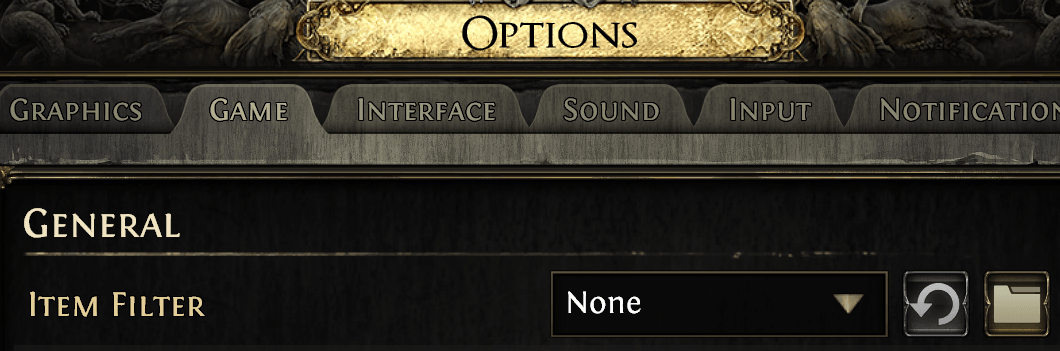
How it is implemented in PoE1 and PoE2 was exactly how I described a loot filter in the previous section of this guide. Basically, it helps remove almost all of the useless junk, leaving only the ones that are actually picking up.
You can even customize things further by adding special colors for a specific group of items, as well as removing more items from the pool and preventing them from appearing on your screen.
Diablo II: Resurrected Loot Filter Guide
Okay, so you now know what a loot filter is and what it actually does. The next question would be: How do I install a loot filter for Diablo II: Resurrected?
As I have alluded to earlier, there is no official way to install a loot filter in D2R at the time of writing this article. However, there are certain workarounds that would somehow let you enjoy some of the benefits of a loot filter, though not as robust as in PoE and other games.
Are you interested in knowing how it is done? You will find out in the next sections!
Simple Loot Filter
The first item filter is actually a mod that you can use in the game. Take note that this is only applicable for offline mode and is not meant to be used on the live version.
Having said that, here are the steps to install and use the Simple Loot Filter:
- Go to Nexus Mods and download the D2R Simple Loot Filter. You must create an account on this site to be able to do this.
- Extract the mod you have downloaded to reveal the “Filter” folder. Copy and paste this into your D2R directory.
- In your D2R directory, create a new folder and name it “mods” (without the quotes). Enter the mods folder you have just created and paste the Filter folder you have downloaded previously.
- Go back to the root directory of your D2R installation. Right-click on the D2R icon and select “Create Shortcut.” You can place the shortcut anywhere you like (the Desktop is the most convenient).
- After moving the shortcut, right-click on it and choose “Properties.” From here, type -mod Filter in the “Target” section. Press the spacebar after the “D2R.exe” and then type the -mod Filter string. Click “Apply” to save changes.
- Fire up the game from the shortcut you have created. Exit the game shortly after getting into the character select screen.
- If you have already enjoyed the single-player version of D2R in the past, you should see a folder in Documents where your saved files are stored (UsersUserSaved GamesDiablo II Resurrected). You can actually copy and paste them into the mods -> Filter folder (which is also located in Documents). If this is your first time playing single-player, you can skip this step.
- After everything is done, simply fire up the game using the shortcut you made earlier, and that’s it!
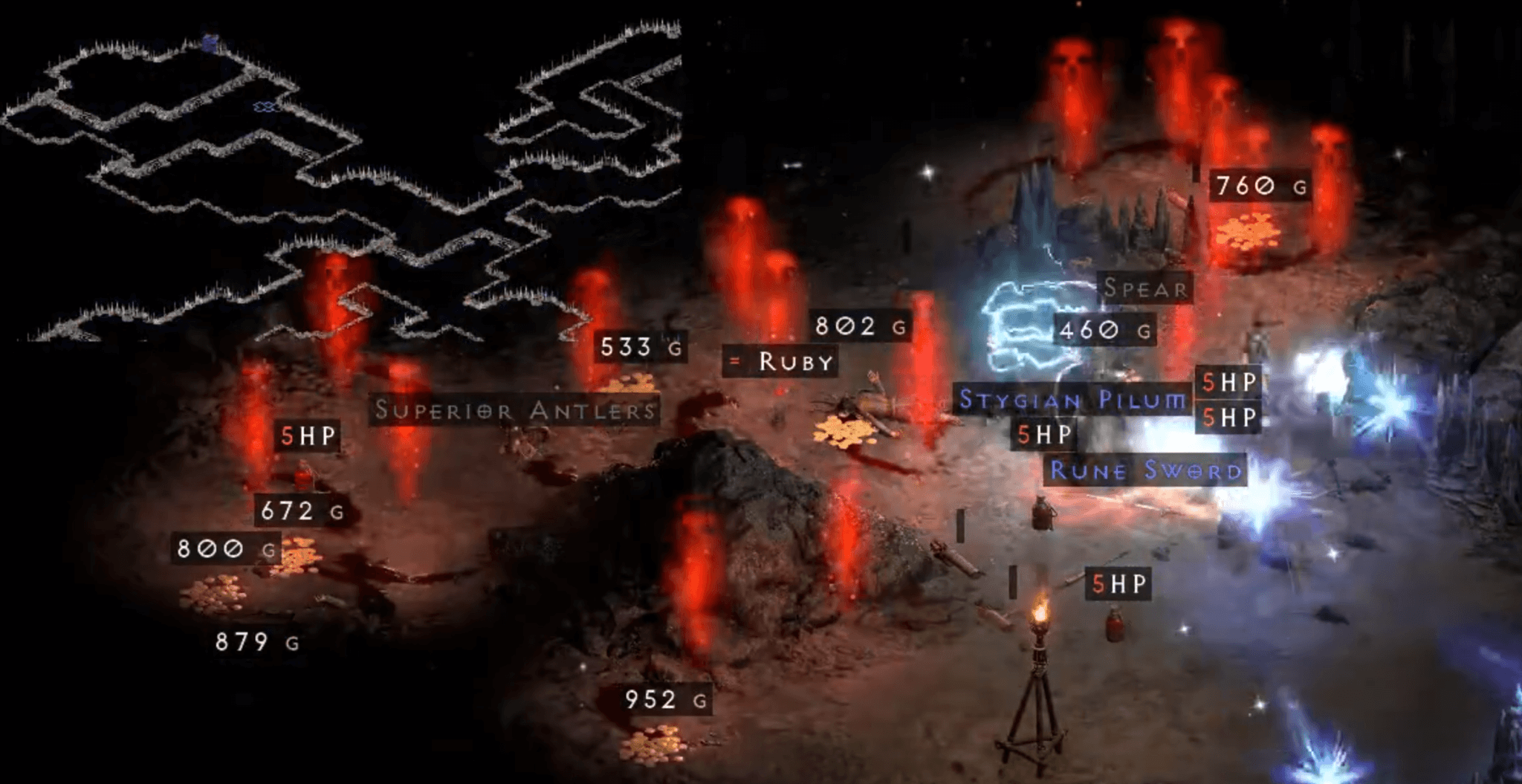
Once you have installed the Simple Loot Filter, you should see something like what is shown in the image above. Now, you have to manage your expectations here because the loot filter is not as robust as those you can find in Path of Exile and Path of Exile 2.
For starters, the names for your health and mana potions have been truncated to 1HP/1MP. This is actually quite helpful, considering that these potions drop very frequently in the endgame for some reason.
Additionally, high-value runes like the Vex Rune and Zod Rune have the words “pick up” to let you know that they should be looted off the ground. For low-quality runes, you simply see the rune’s name, as well as its quantity.
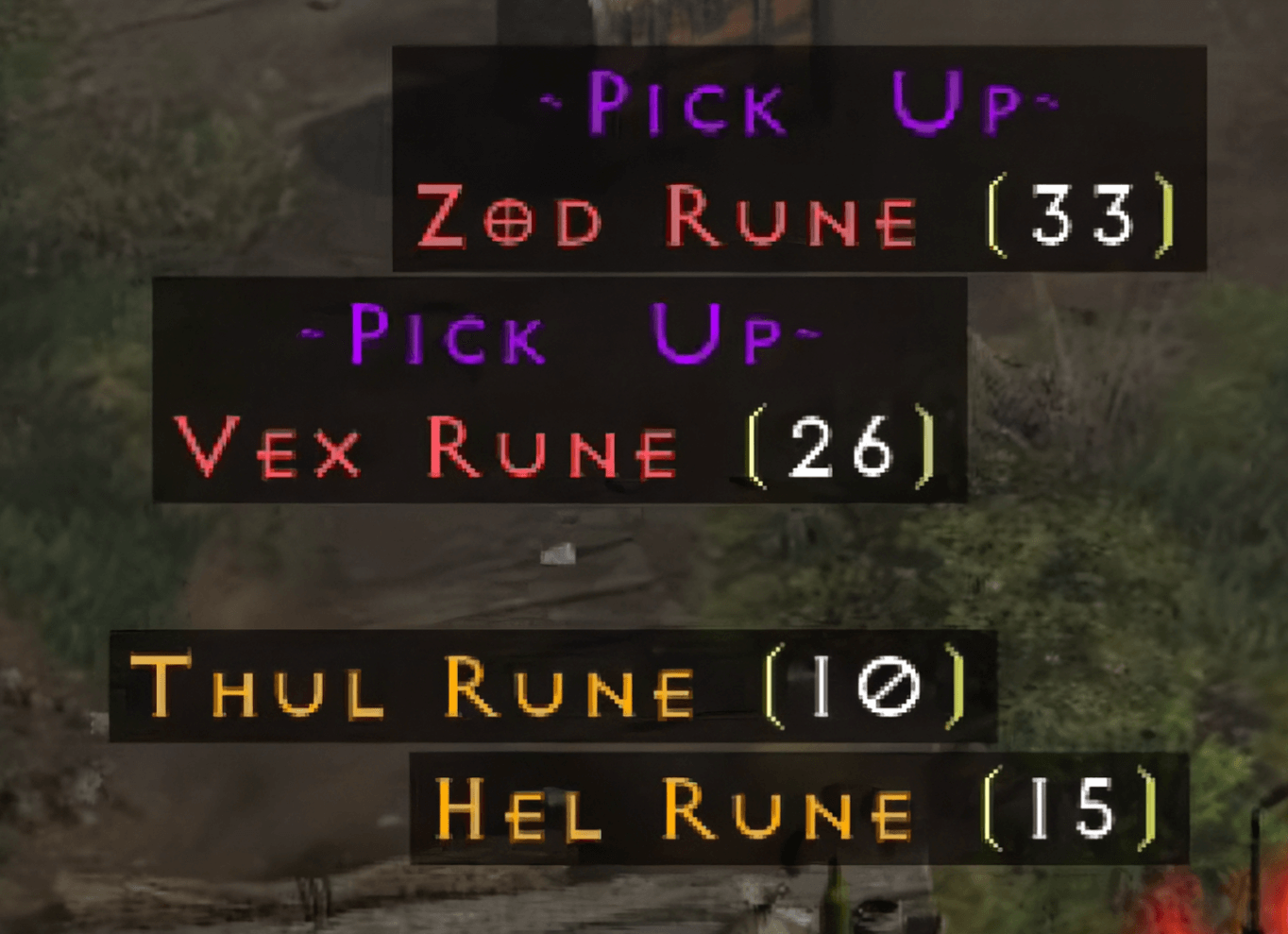
It is important to note that this is only for the offline version of D2R. The Simple Loot Filter does not work in online play. Hence, the need for an official loot filter, which will likely be implemented as part of the 25th anniversary of the game (fingers-crossed).
Practical Item Filter
There is another loot filter that you can try out. This time, it can work online, though your mileage may vary!
Practical Item Filter is another popular third-party loot filter for Diablo II: Resurrected. It’s a bit more feature-rich than the Simple Loot Filter above, but its functions remain largely the same.
Anyway, if you want to give this a try, here are the instructions on how to install it:
- Head to Nexus Mods and download the Practical Item Filter. Save the Filter file and extract it.
- Next, download the Diablo II: Resurrected Mod Manager (which is also found in Nexus Mods). This will create a mods folder.
- Right-click on D2RMM and click “Open File Location.” From here, copy and paste the extracted folder from Step 1 into this location.
- Run D2RMM and select the Practical Item Filter. Click “Install Mods” shortly after.
- Fire up the Battle.Net Launcher, select Diablo II: Resurrected, and then click on the gear icon (the small one right next to the “Play” button).
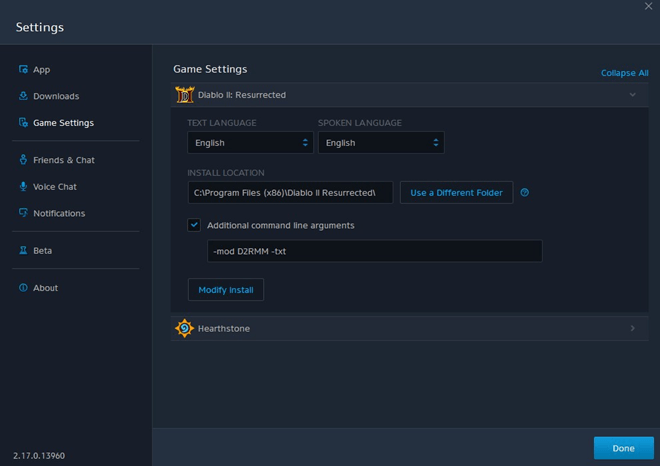
- Click “Game Settings”, put a check on “Additional Command Line Arguments”, and add “-mod D2RMM -txt” in the text box below. Click done.
- After that, press “Play,” and you should be able to utilize the Practical Item Filter online!
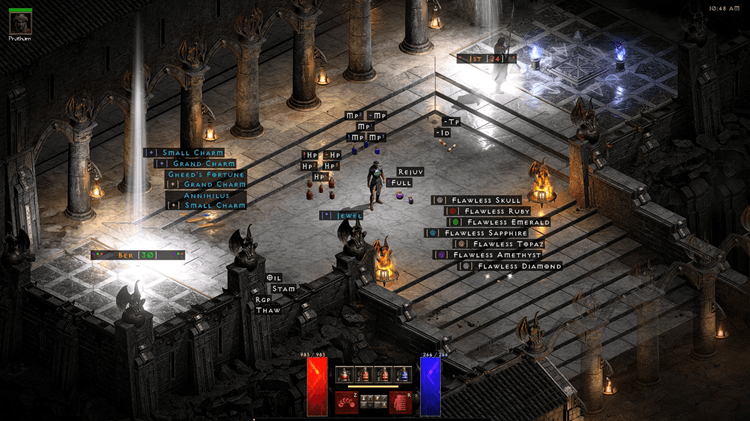
The Practical Item Filter is the more modern version of the Simple Loot Filter mentioned above. The items look better, and there are “light pillars” that highlight valuable items, which is great for those who are new to Diablo II: Resurrected.
Project Diablo 2
While this is not Diablo II: Resurrected, per se, it is a fan-made mod of the original game. Project Diablo 2 is a mod that tries to modernize this two-decade-old ARPG by adding a slew of improvements, such as:
- Stackable Items: You can actually stack runes and other items, which you currently cannot do in D2R.
- Quick Cast Spells: You can bind as many spells as you want and instantly cast them whenever the appropriate hotkey is pressed.
- Reroll Maps: Influence certain areas in the game with modifiers that allow you to fully customize your experience.
In Project Diablo 2, there is an in-game loot filter similar to the Path of Exile games. In fact, they are so similar that you also have to go to the PD2 website and find the loot filter that you want to use.
The only difference that they have is in the process of installation. Whereas PoE 2 relies on third-party websites like Filterblade to create and customize item filters, you can download custom-made loot filters from the official PD2 website itself.
Having said that, search for any publicly listed filters under the “Item Filtering” section of the website and then click on them. Doing so will direct you to a website that is filled with a wall of text.
Press Ctrl+A on the keyboard to highlight the entire text and then Ctrl+C to copy it. After that, go to the installation folder for Project Diablo 2 and search for the FILTER file (which is named “default” in the folder, unless otherwise changed manually). Double-click the file and then paste the entire text into it by pressing Ctrl+V. Press Ctrl+S to save.
Run the game and then head to the special PD2 settings menu. Make sure that these five options are checked:
- Always Show Item Stat Ranges
- Advanced Item Display
- Item Drop Notifications
- Item Close Notifications
- Item Detailed Notifications
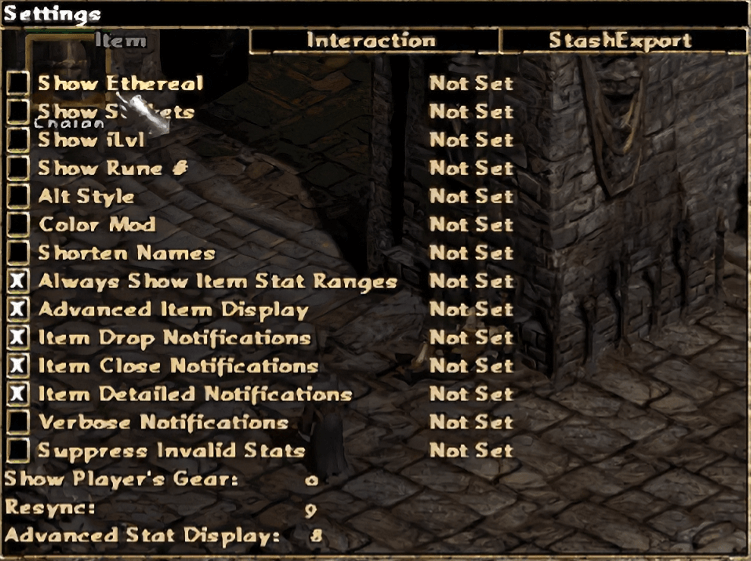
Unlike the Simple Loot Filter, the PD2 filter is more robust in its functions. It is quite similar to the one you find in Path of Exile 2, though you have to keep in mind that PD2 itself is only a fan-made mod. However, I still think it’s worth pointing out because this mod allows you to play Diablo II, which actually has a fully functioning item filter that is worth checking out!
FAQ
Does Diablo II: Resurrected Have a Loot Filter?
Yes and no. Yes, there is a functioning loot filter for the game, albeit it’s only available in offline play, and you have to do some extra steps to install it.
No, in the sense that there’s no item filter officially available in the game right now. Hopefully, the company will finally bring it into D2R as part of the franchise’s 25th anniversary.
Are Third-Party Loot Filters Allowed in D2R?
Although Blizzard is strict with regard to any modifications, players have been using third-party loot filters since Diablo II: Resurrected was launched. Whether you are installing the Simple Loot Filter or enjoy the Practical Item Filter, you should be fine.
Historically, no player has ever been banned utilizing the aforementioned D2R loot filters. Of course, there is some inherent risk here, given that these loot filters are technically made by a third party.
Be that as it may, the use of these filters is generally safe in D2R.
Can Loot Filters Improve Farming Efficiency?
Absolutely! Loot filters effectively remove the junk items and only leave the more valuable ones.
Is Blizzard Likely to Add an Official Loot Filter to the Game?
There has been no official announcement regarding this matter. However, with the community clamoring for a loot filter since the dawn of the original Diablo II, it’s probably something that the company has been thinking of implementing.
If Blizzard ever adds an official loot filter, it will probably be a part of the 25th anniversary of Diablo II.
What Are the Risks of Using Third-Party Tools?
Technically, the use of third-party mods is bannable, according to Blizzard’s ToS. Despite that, players have been using custom loot filters in D2R for quite a while, and no one has been banned because of it.