


PoE Economy Guide: Trading Tips for Beginners
12.01.2026 - 05:21:46
Game Guides , Path of Exile


Having the best possible gear is one of the core objectives in playing Path of Exile. Of course, a lot of that involves RNG. While some people get lucky in acquiring some highly coveted uniques like the Headhunter or Mageblood, the vast majority do not have the same kind of luck. Hence, the need for trading.
Trading in Path of Exile has come a long way. It is now much easier to do than ever before, thanks to the introduction of asynchronous trading in Patch 3.27. Fortunately, veterans of the game can still enjoy the traditional way of trading, especially if they do not have the new Merchant Stash Tabs yet.
In this article, I will go over the importance of trading in Path of Exile and why you should know this important bit of information if you want to get the best possible items for your character.
Before we begin, I would like to invite you to our PoE Store. If you do not have access to Merchant Stash Tabs or you don’t want to wait for a reply from other people just to trade, you can visit our online shop and buy whatever it is that you need for your build. We are open 24/7, and we support various payment methods!
PoE Trading 101: How the Path of Exile Economy Works
Unlike other role-playing games, where there are established avenues that allow you to purchase items, trading in Path of Exile is a lot different. It often involves another person in the mix. Think about the buyer and seller relationship, if you will.
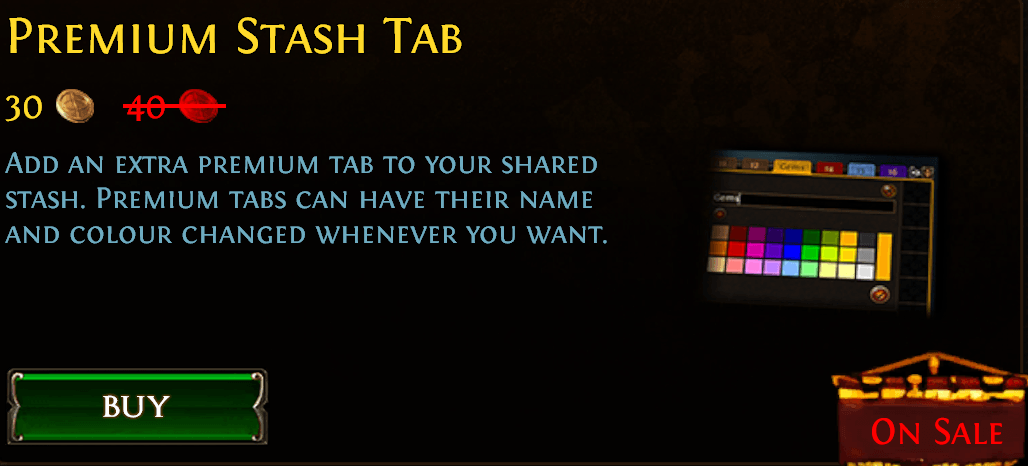
The seller will place their items in their Premium Stash Tabs so that they will be visible on the PoE Trade website. The buyer will then go to the official trade site, search for a particular item, and then wait until the seller responds to complete the transaction.
While that has been the standard for a very long time, Grinding Gear Games has added asynchronous trade in Patch 3.27. This is to address a lot of key issues with Path of Exile trading, such as unresponsive sellers, low-ballers, and so much more.
So, how does asynchronous trade work? Basically, you can now buy items even if the seller is offline. Conversely, you can put up your items for sale, and then people can just go to your hideout to buy them from Faustus.
Now, there are important things to keep in mind when it comes to trading in Path of Exile. For one, you need to have a Premium Stash Tab or the Merchant Stash Tab to be able to sell items to other players.
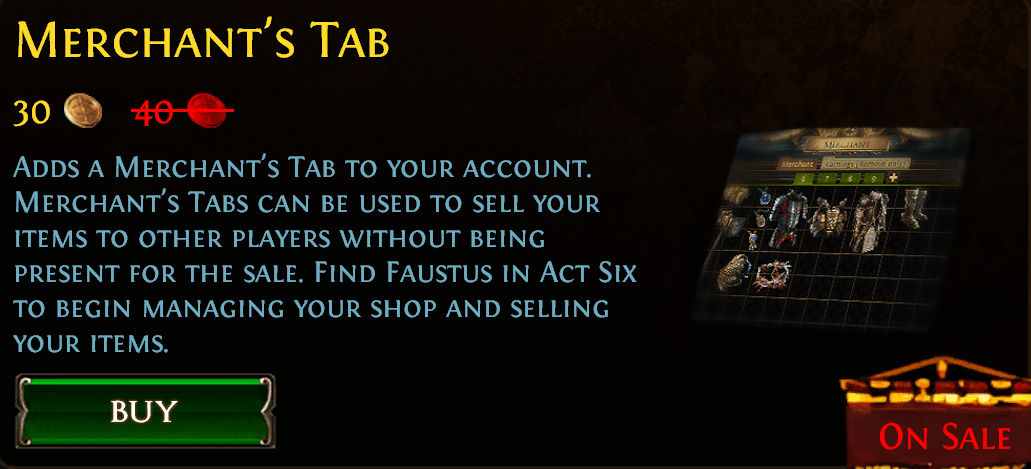
Furthermore, the Merchant’s Tab is required if you want the ability to sell items while you are offline. You cannot do this with the Premium Stash Tab, though.
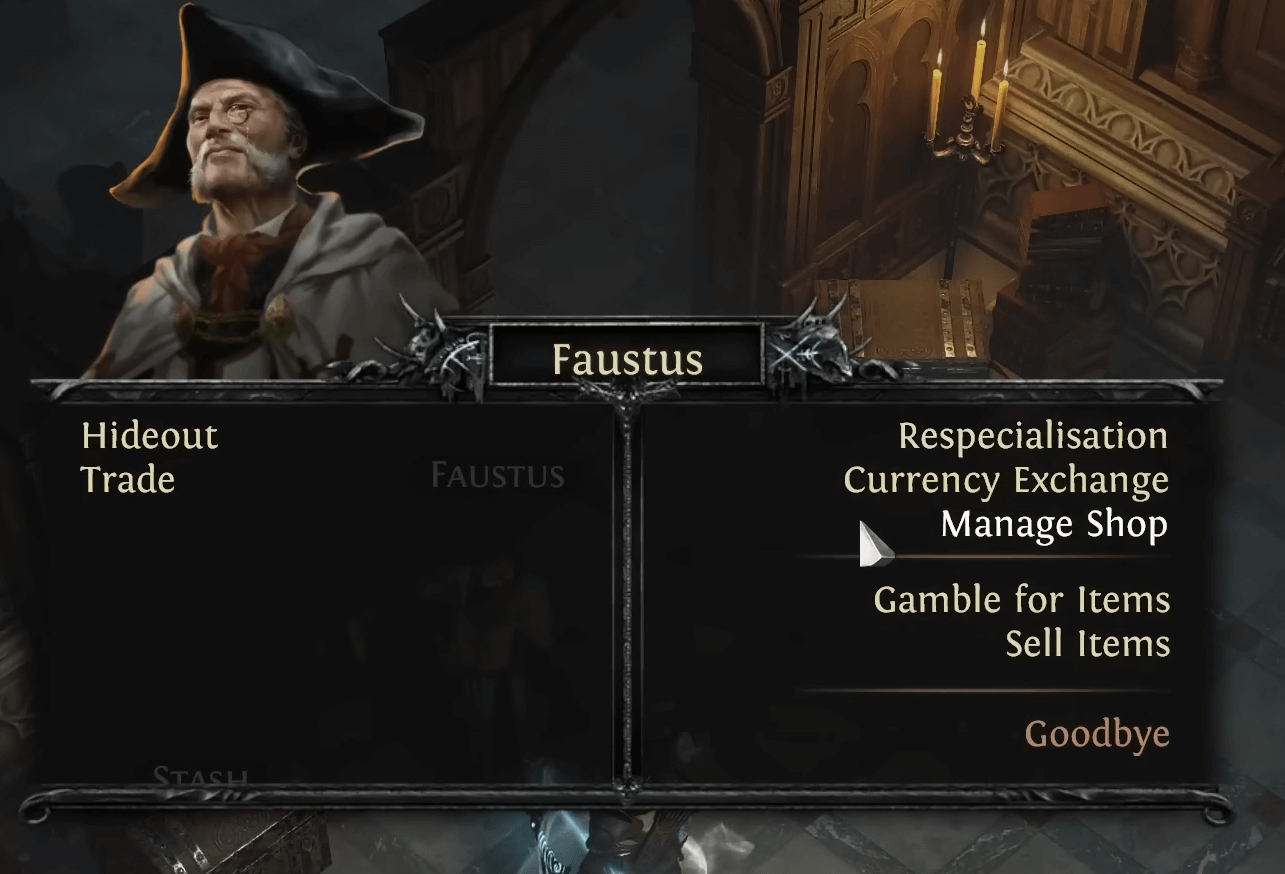
Selling items through the Merchant’s Tab is simple. Go to Kingsmarch or your hideout and interact with Faustus. You should see the option to “Manage Shop.” If this particular option does not appear, then that means that you still do not have a Merchant's Tab ready, so be sure to purchase it from the in-game microtransactions store.
From there, simply drag and drop the item you wish to put up for sale, and then set the price accordingly. If it is a valuable item, make sure to select Divine Orb as the currency of choice. For common items that are still worth something, the Chaos Orb is fine.
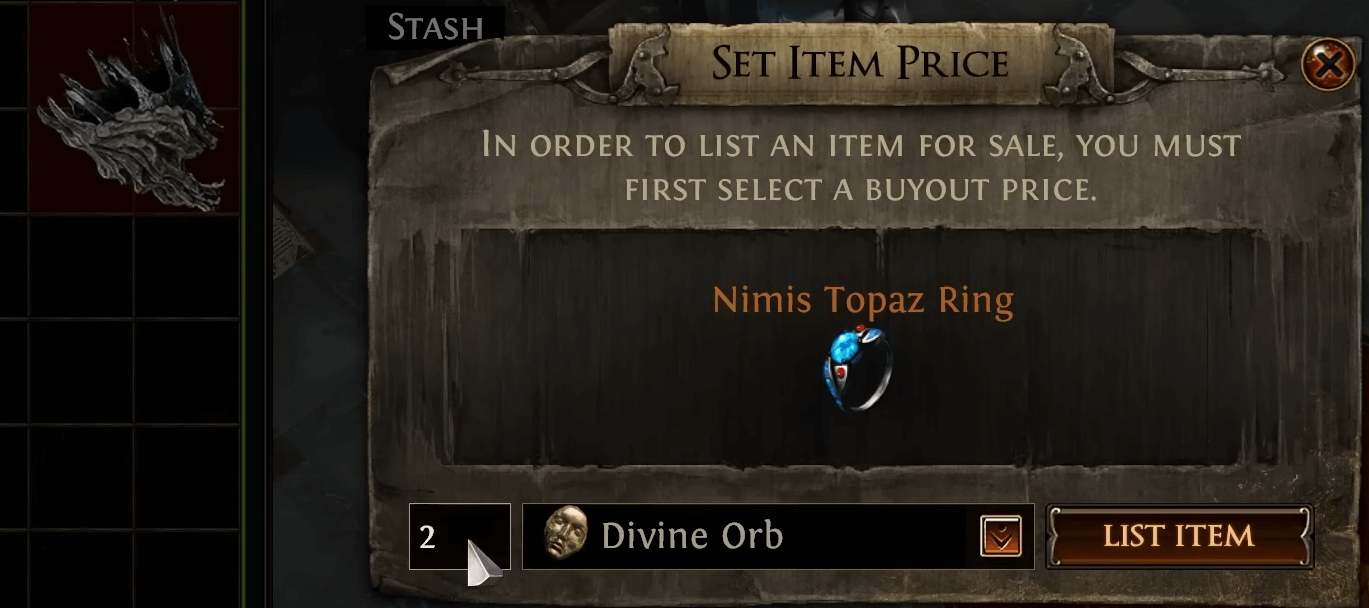
Once you are finished, the item should be visible on the trade website. If it’s still not on there, just wait a couple of minutes for the system to refresh.
Another thing that GGG has implemented in Patch 3.27 that is related to trading is the in-game market panel. This feature alleviates the need to open up a third-party web browser because you can now search for items directly inside the game!
To do this, click on the menu button beside your HP globe (the one with the arrow pointing upward), and then select “Market Panel.” You should see a new window just like this:
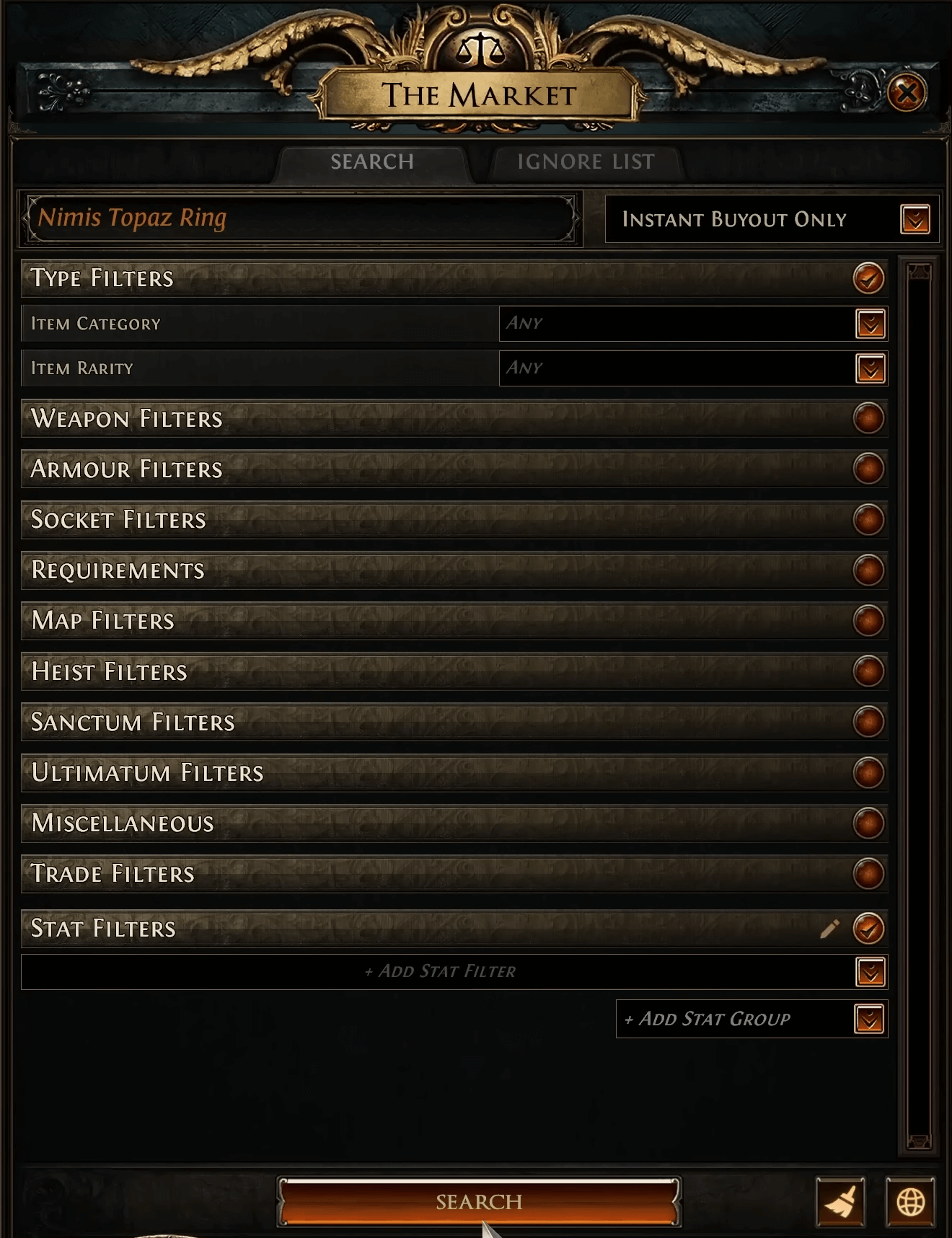
If you don’t want to engage with other people and would just like to purchase an item without additional interaction, make sure to select “Instant Buyout” from the drop-down menu on the right side.
Keep in mind that setting the Instant Buyout only option effectively cuts the possible search results by half. This is because some people still don’t have access to Merchant Tabs yet. If you are okay with it, choose “Instant Buyout and In Person” instead.
Aside from the name of the item itself, you should add specific modifiers under “Stat Filters.” This is quite helpful if you are searching for a mirror-tier bow for your Tornado Shot Deadeye, for example.
So, in summary, trading in Path of Exile involves the following:
- A buyer and a seller
- Items can be sold manually (via Premium Stash Tab) or automatically (via Merchant Stash Tab)
- Asynchronous trade is only possible if you have a Merchant Stash Tab, which requires you to spend real money to obtain
- If you are the seller and you have priced your items accordingly, those items will be available either on the official trade website or in the market panel inside the game
- For asynchronous trades, visit Faustus in your hideout or in Kingsmarch to manage your shop
Currency Exchange
If you want to buy PoE Currency, there is actually another feature built into the game that allows you to do just that. I am, of course, referring to the Currency Exchange. If you are looking for this feature, Faustus is your guy!
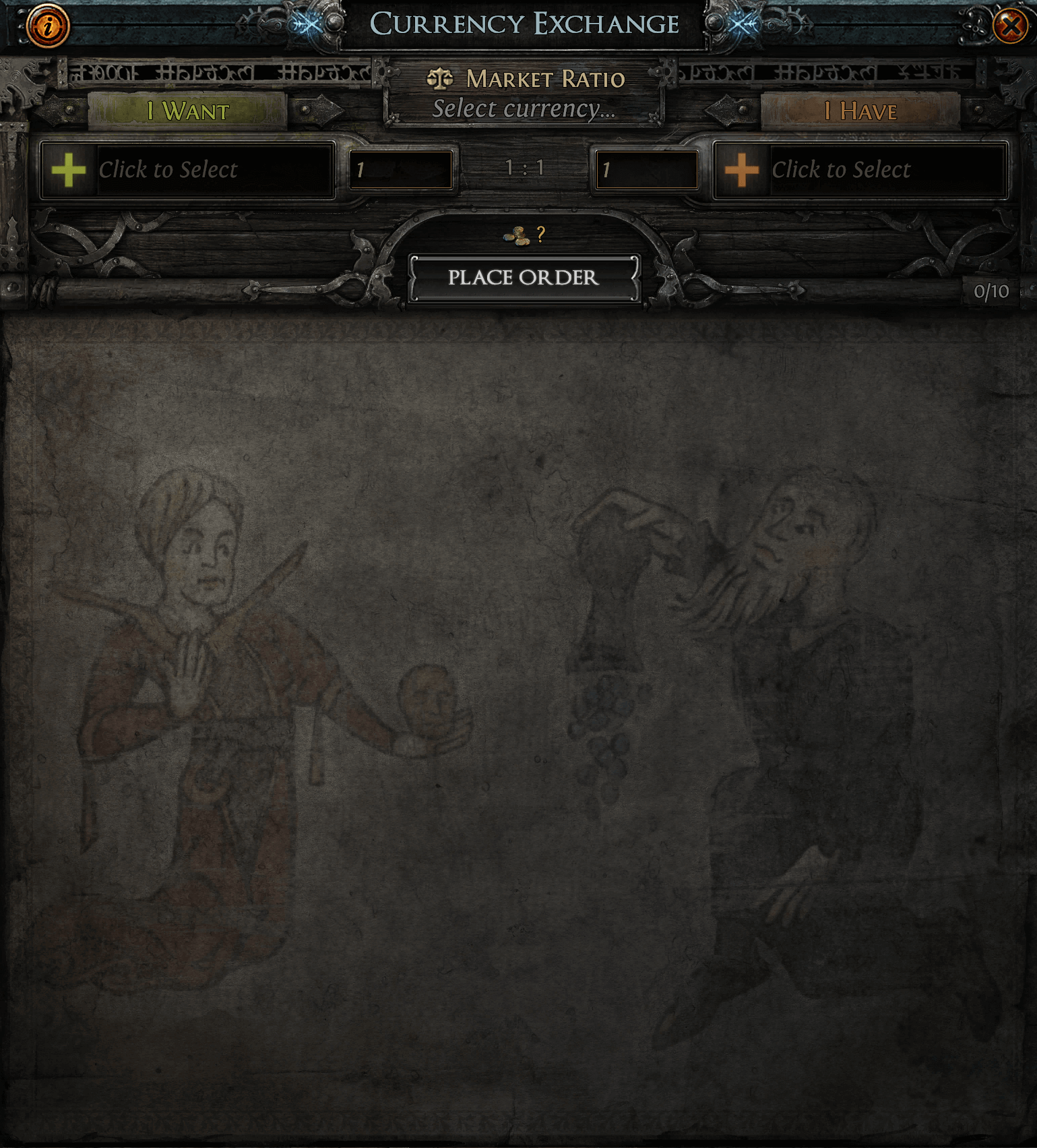
The Currency Exchange UI presents you with two blank spaces. The one on the left lets you decide which PoE Currency you would like to purchase. Let’s say you need a single Divine Orb to improve the modifiers on your endgame gear. You should select Divine Orb from the pool of currencies on the left side (under “I Want”).
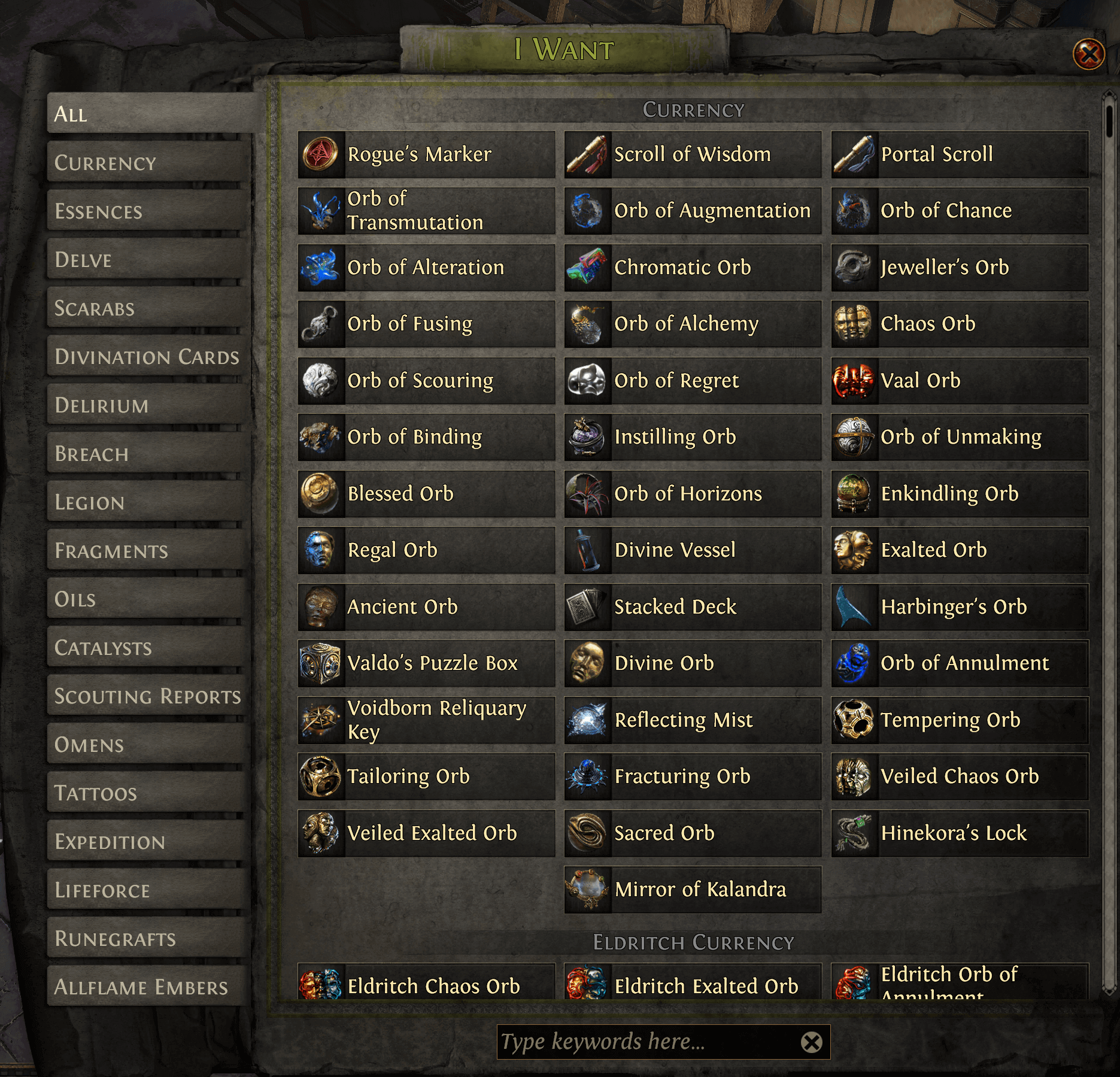
On the right-hand side is the item that you currently have, which you want to use as the currency for trade. Divine Orbs in Path of Exile are typically bought using Chaos Orbs, but Exalted Orbs are a good alternative.
After selecting the appropriate currencies, you will be given a ratio. At the time of writing this article, a single Divine Orb is worth 450 Chaos Orbs. Take note that the market in Path of Exile is quite volatile, so an item that is priced as such might be worth more or less without a moment’s notice.
The Currency Exchange’s ratio should give you an idea of how to price similar items accordingly. You can set the price higher than usual, but expect that particular currency not to sell as quickly as it would have if it had a much lower value.
Amazing Tools to Use for Trading in PoE
Path of Exile players use a couple of incredible tools when trading items in the game. Awakened PoE Trade is such a program, and it has been available for so many years at this point.
What does Awakened PoE Trade do? This program’s typical use case is to check the price of items based on the modifiers that they have. It is quite useful when doing a price check on rare items, particularly those that are perceived as “mirror-tier.”
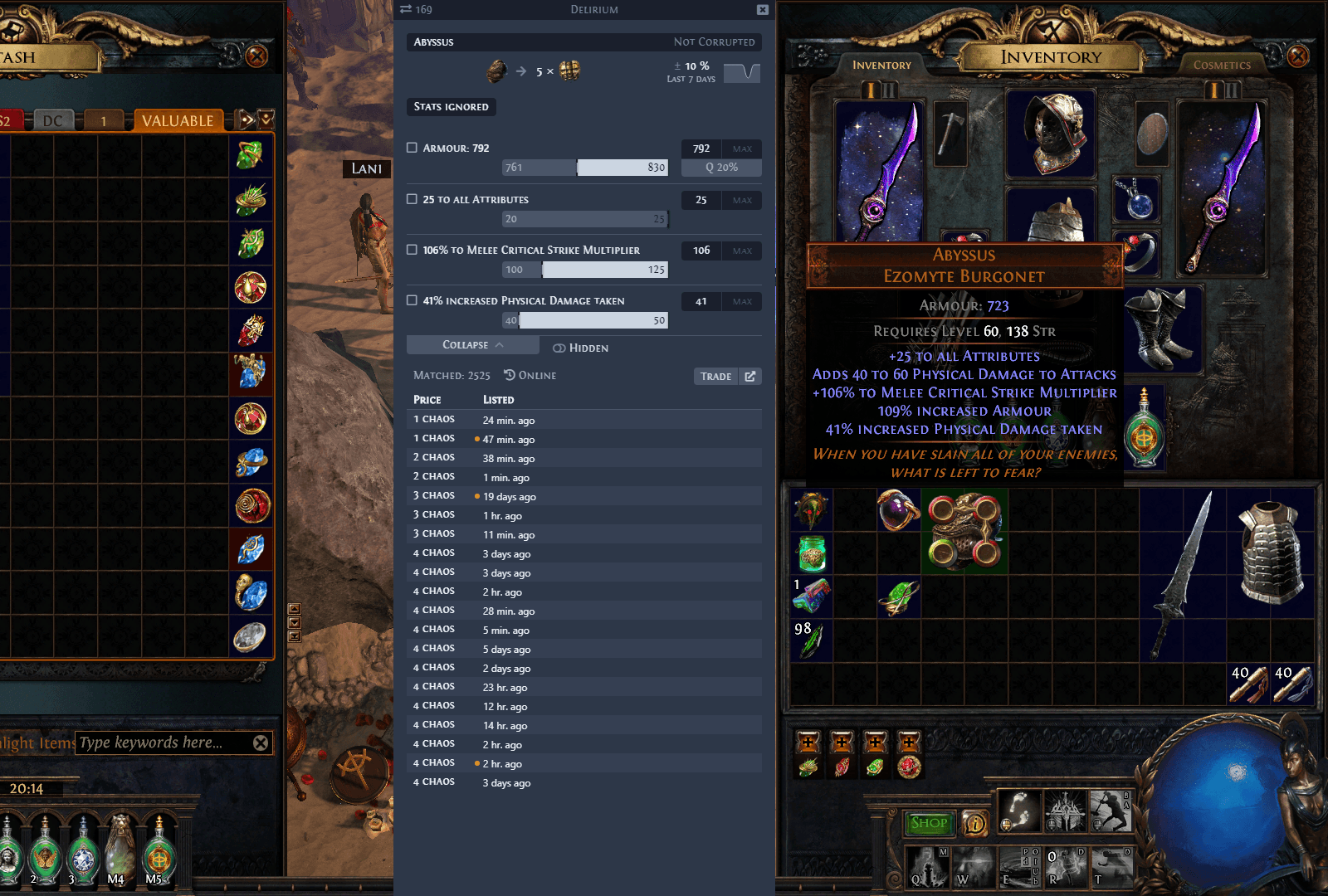
Although Awakened PoE trade is a third-party program, utilizing the said software is actually safe. In fact, GGG has acknowledged its existence and is okay with it for the purpose of price checking only.
If you are going to use Awakened PoE Trade, make sure that your game client is set to either Windowed Mode or Windowed Fullscreen. This is so that the overlay will pop up whenever you use the appropriate hotkey (default: Ctrl+D).
Additionally, I highly recommend that you install the program. Sure, there is a portable version of Awakened PoE Trade, but it works much more slowly than installing the software on your PC.
Another nifty tool that you can use is Better Trading. For those who do not know, Better Trading is a browser extension that has a few nifty features, including:
- The ability to “pin” items, allowing you to get back to them while scrolling down with just a click of a button
- Create bookmarks to certain items so that you can quickly get back to them when needed
- Provides you with the most recent history of items you have searched on the trade website
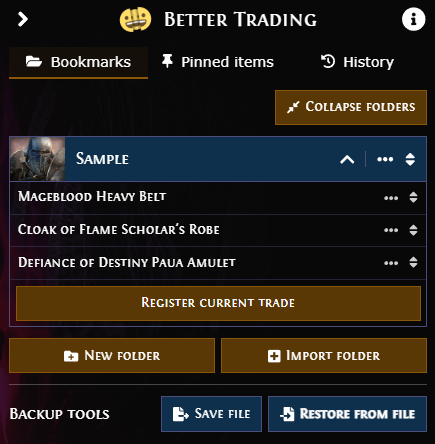
Under the “Bookmarks” section of Better Trading, you can create as many folders as you like. In each folder, you can “save” different items, which you can get back to just by clicking on the item’s name.
For instance, let’s say that you are playing the Righteous Fire Chieftain build, and you are looking for good deals on the Mageblood, Cloak of Flame, and Defiance of Destiny. You can browse the individual pages of these items and click “Register Current Trade” to save them in your bookmarks folder.
Whenever you go away from your computer and come back at a later time, simply go to the PoE trade website, click on the Better Trading icon (typically situated at the upper-right corner of the screen), and then left-click on the item that you want to check again (hopefully, now at a much lower price than before).
Searching for a good deal on PoE trade can be quite a chore. If you don’t believe me, just search for “Mageblood,” and you’ll find multiple entries on the same page. If you’ve found a particularly good price on an item but you still want to move further down the page to find better ones, you can use Better Trading’s “pin” feature to get back to that item immediately.
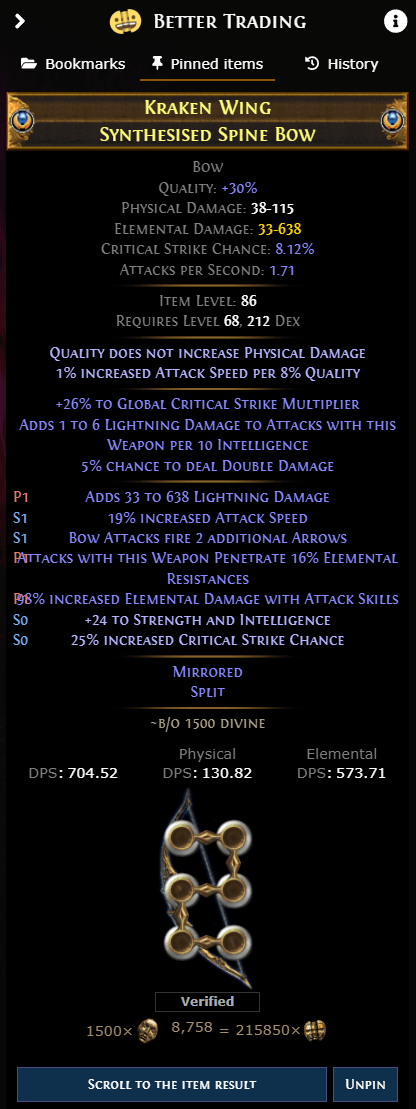
Keep in mind that the things you have pinned will be removed if you are searching for an entirely different item. Nevertheless, the pin feature is quite amazing, especially if you are using it to find and compare mirror-tier gear.
How to Price Items Correctly
Okay, so you have crafted a mirror-tier body armor. That’s great! However, you are wondering how to price that piece of gear correctly. In the next sections, I will give you some useful tips on how to do just that!
Via Awakened PoE Trade
The easiest way to learn the price of your item is simply by checking the price of similar items using Awakened PoE Trade. By default, the hotkey for this is Ctrl+D. Make sure that the program is running before you do this so that the overlay will pop up.
Manual Search on PoE Trade
If you are not comfortable using Awakened PoE Trade (because it is a third-party program), a good alternative is conducting a manual search on PoE Trade.
To do this, input the specific modifiers on your item under the “Stat Filters” section on the main page. Ideally, you want to put all six modifiers of the item to really narrow down the search results. If nothing comes up, slowly delete certain modifiers one by one until at least a single item is visible during your search.
Once you have found a comparable item, you can either price yours a bit higher than what is on the market or lower, depending on your preference. Just like in the real world, the lower-priced item always gets purchased first.
PoE Ninja
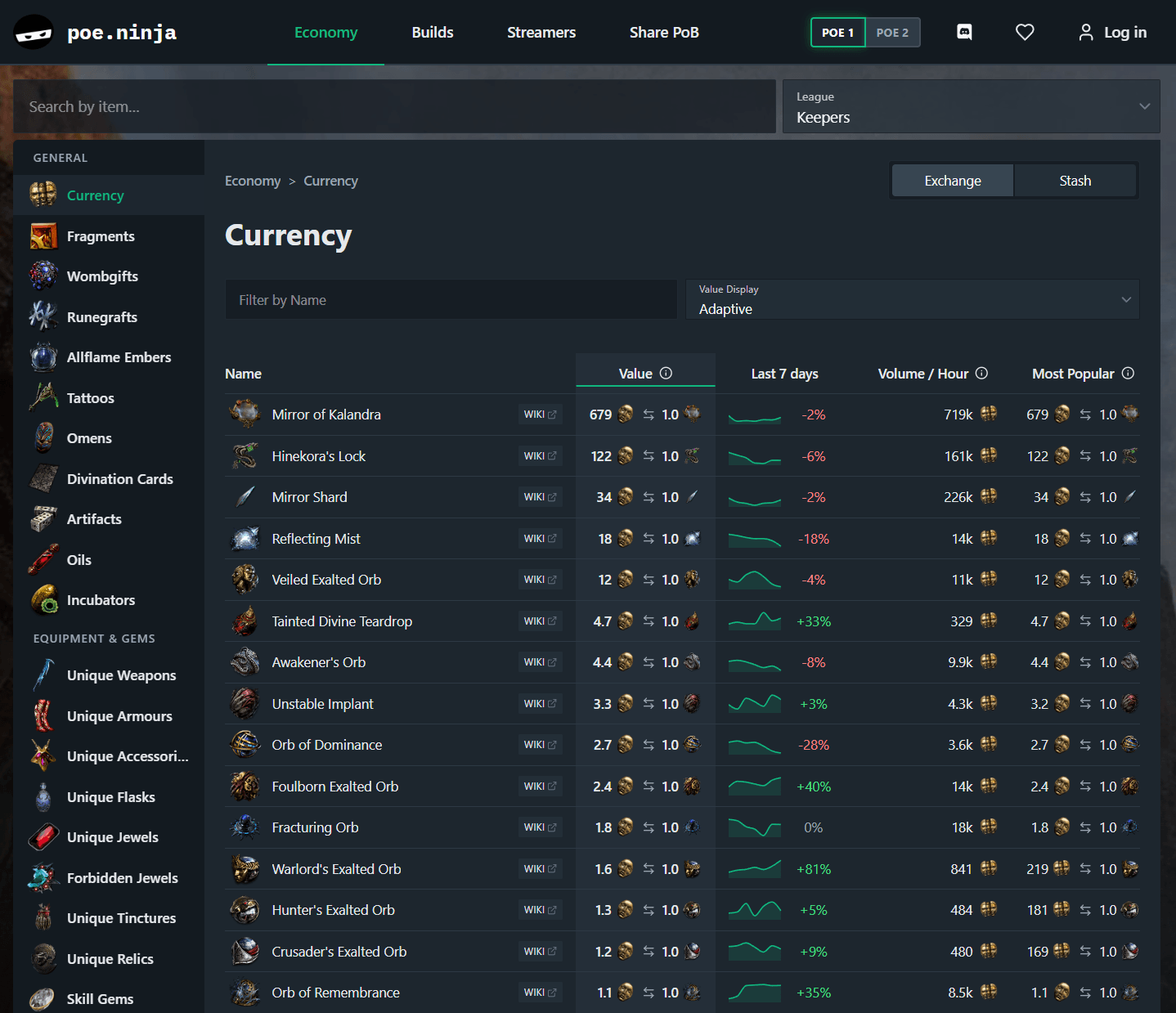
For more established items like PoE currencies and uniques, you can go to PoE Ninja. Once you arrive at the website, click on the word “Economy” in the upper-middle portion of the screen. After doing so, you will be presented with various items and their current pricing history. This should give you a good idea of how the item fares in the current market.
Avoiding Scams and Bad Trades
The advent of asynchronous trade in Path of Exile has significantly reduced the incidence of scams and bad trades. However, there are still some people who get duped into buying an overpriced piece of gear and whatnot.
Don’t be scammed by following these simple tips:
- Always check the price of an item on various platforms, such as the trade website or PoE Ninja, before making the purchase.
- Choose “Instant Buyout” to prevent the situation where the seller could give you the wrong item.
- Some items, such as those that cost multiple Mirrors of Kalandra, are sold only via in-person trade. If this cannot be helped, make sure to inspect the item on the seller’s window before and after they lock the item in.
- As an added step, some communities have a reputation system that tells you whether a particular person is trustworthy or not.
Building Currency as a Beginner
To be able to trade items with other players, you must have the right amount of PoE currency. If you are new to Path of Exile and would like to know some tips to help you farm currency, you have come to the right place!
Here are some awesome tips to help you farm currency effectively:
- Make sure to run a good league starter build. Aim for those builds that utilize AoE skills and that don’t require specific items to work.
- Always think about efficiency. If you can complete a T16 map in under five minutes, but you can clear a T12 map in two minutes, then the T12 map is better for your overall efficiency. The faster you are at completing a map, the higher your return on investment.
- Don’t forget to “juice up” your maps. Use Orbs of Alchemy and Cartographer’s Chisels to improve the quality and modifiers of your maps. This, in turn, will make your maps more challenging, but you are promised better rewards when completed.
- Constantly upgrade your gear. As soon as you get your hands on pieces of gear with better modifiers for your build, equip them immediately. If you are not lucky with item drops, just buy suitable upgrades on trade.
- Party up with your friends. Being in a group not only makes maps harder, but it also improves the item drop multipliers. If you don’t have friends playing Path of Exile, you can simply invite a random person. They don’t even need to be on the same map as you, because their presence in the group should suffice.
PoE Trading Tips for Beginners: Conclusion
Trading in Path of Exile has become much easier with the addition of asynchronous trade. Gone are the days when you have to wait for the seller to reply just to buy something off the trade website.
Although you do need to have a Merchant Tab to use asynchronous trade to sell items, this is still a godsend, as PoE veterans can surely relate.
Thankfully, in-person trading is still available in the game for those who want it. You just have to inspect the trade window to ensure that you are getting the right stuff.
If you are going to play Path of Exile, which trading style are you going to use and why? Let us know in the comments!